An Android-based system prototype optimized for 3.2-inch displays.
By seamlessly integrating physical hardware controls (PTT, recording sliders) with digital operations, this project enhances one-handed efficiency while enabling critical features like one-touch emergency broadcasting, covert recording, and privacy modes—striking a balance between high-stress field performance and evidence integrity.
Project Date/Timeframe
Duration: Jan 14, 2026 – Mar 4, 2026 (Approx. 8 weeks)
Project Timeline & Milestones
Phase 1: Research & Conceptualization (Jan 14 – Jan 28)
Documented design process and conducted background research.
Developed the UX design brief and project concept map.
Phase 2: Task Analysis & Initial Design (Feb 4 – Feb 11)
Identified and documented user tasks specific to frontline responders.
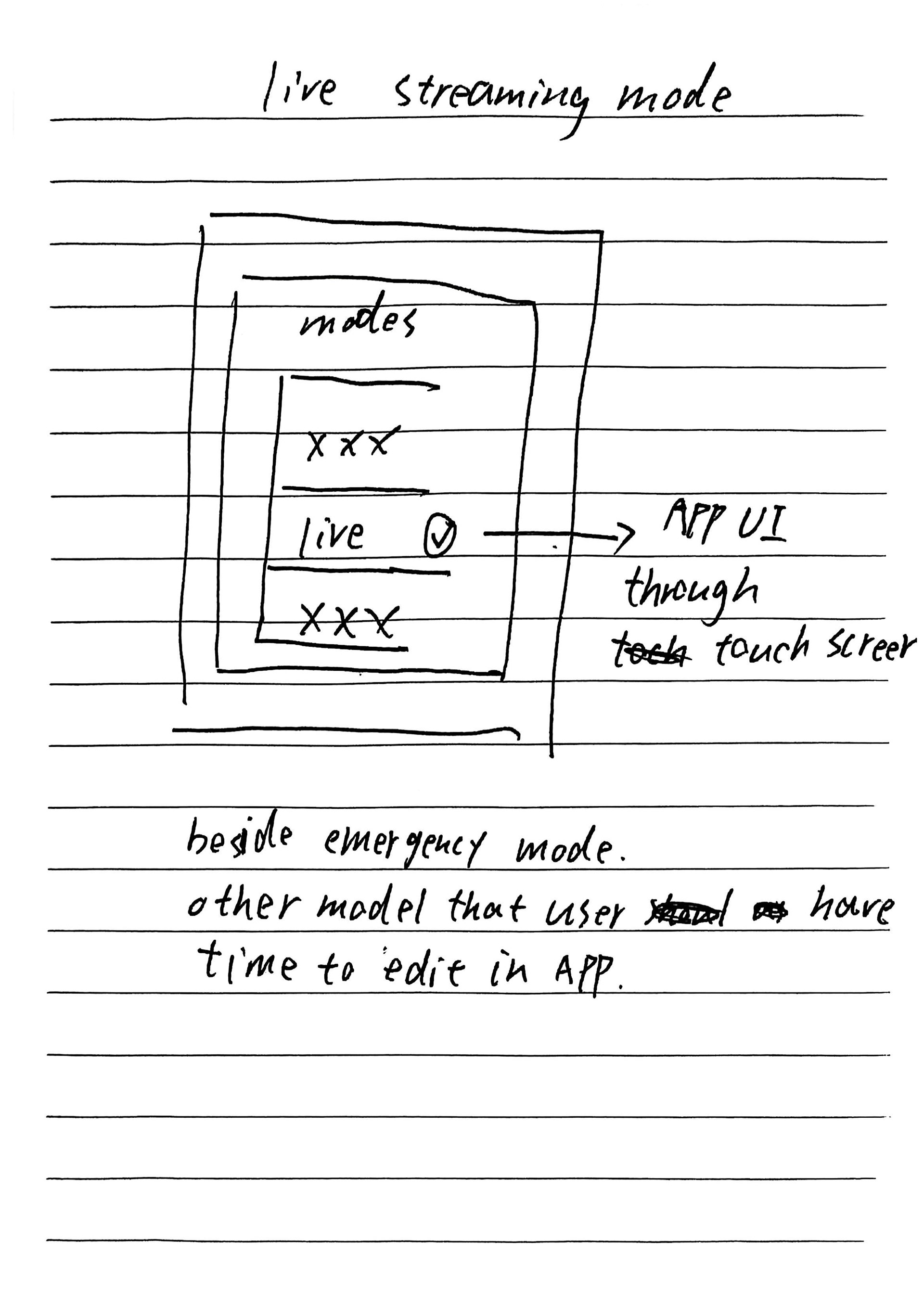
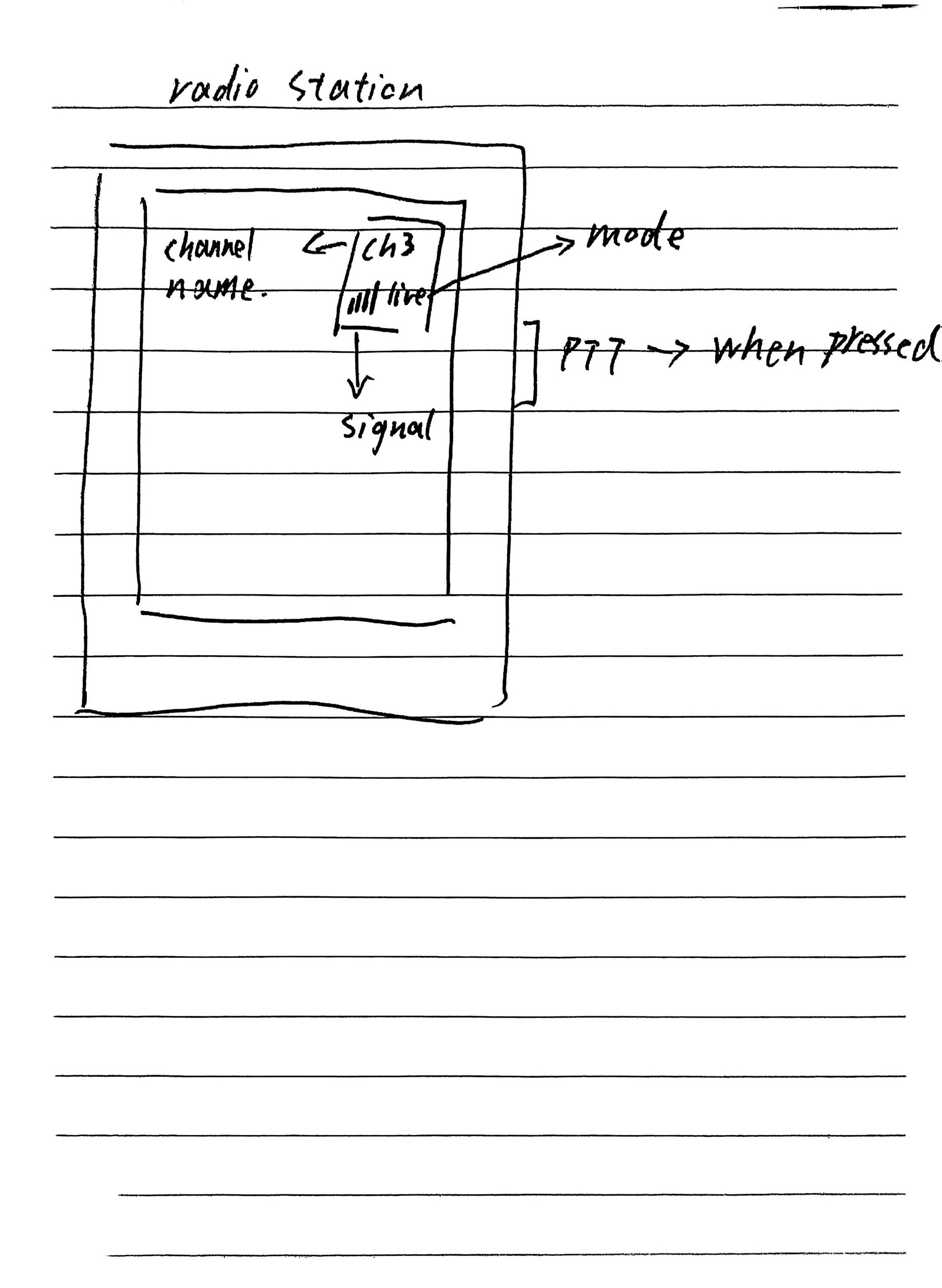
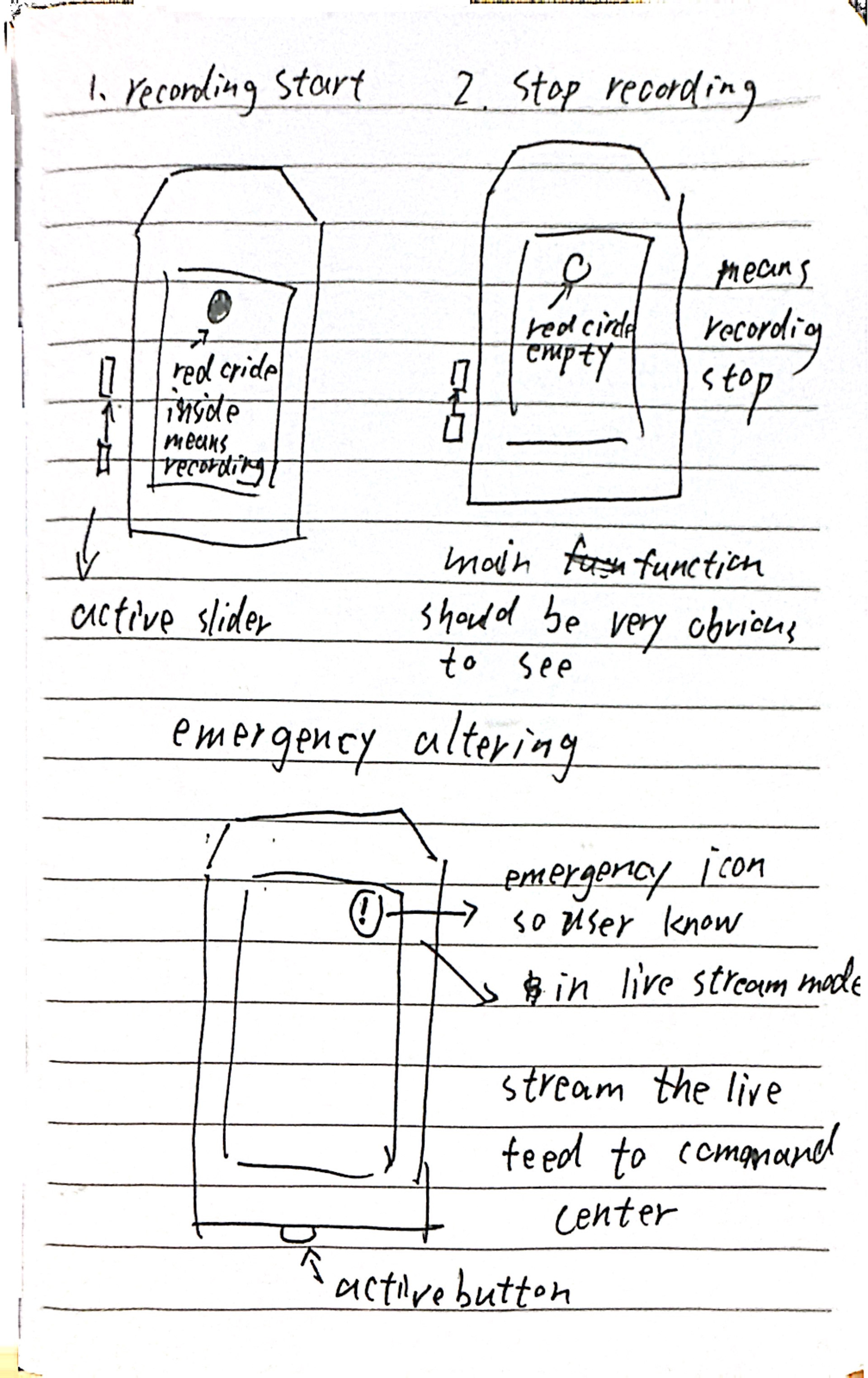
Created initial design sketches for the 3.2-inch interface.
Phase 3: Prototyping & Iteration (Feb 18 – Feb 25)
Developed annotated wireframes and established the project style guide.
Built functional BWC prototypes and conducted finding/discussion notes based on test results.
Phase 4: Finalization (Mar 4)
Completed and submitted the final high-fidelity interactive prototype.
My Role: UX/UI & Interaction Designer
I was responsible for the design research and the creation of core interactive modules, with a specialized focus on visual accessibility for small-form-factor displays.
Phase 1: Independent Design Research
Process Documentation: Independently conducted background research and documented the entire design journey.
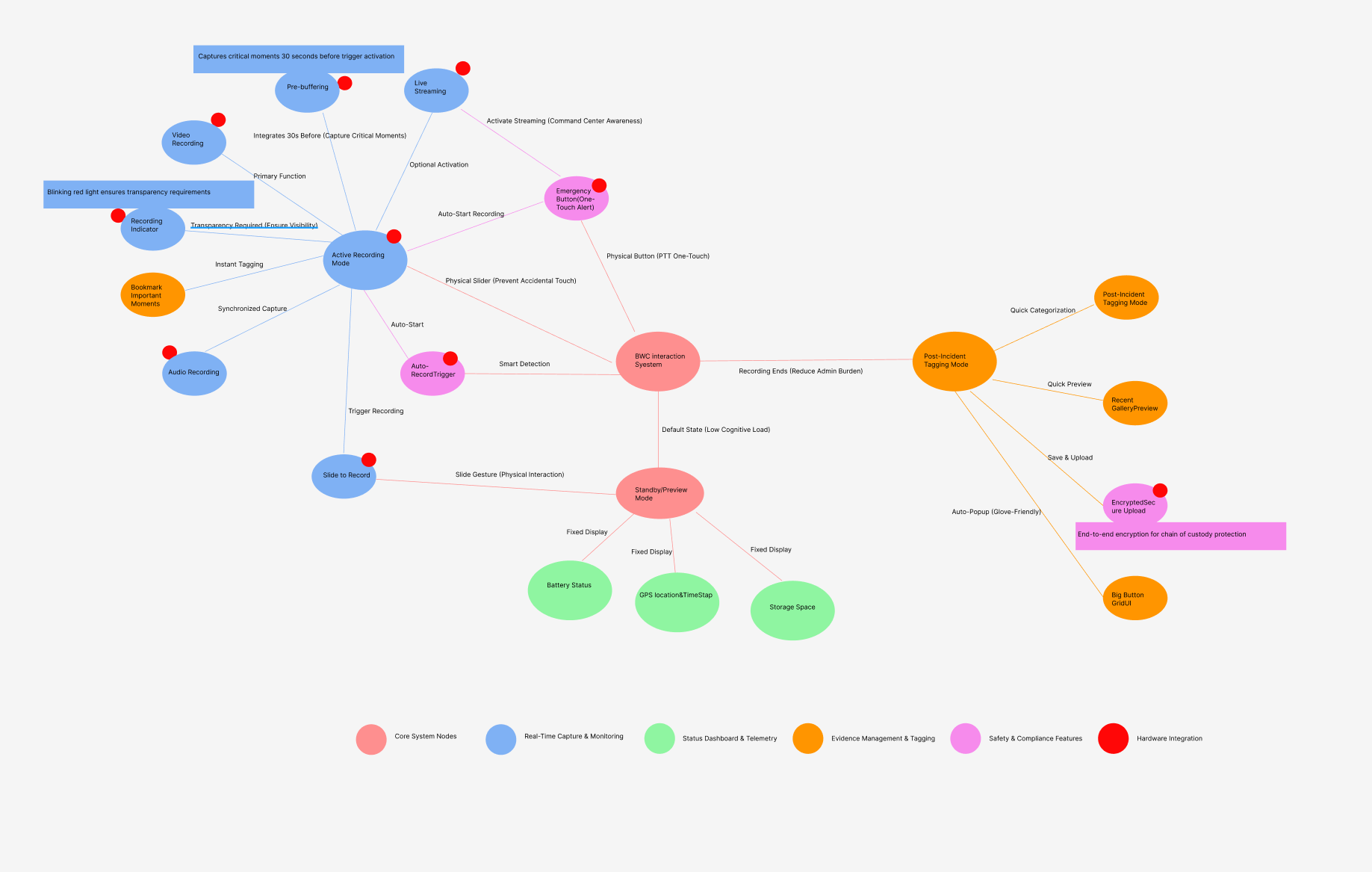
UX Strategy: Developed the project concept map and identified critical user tasks for frontline responders.
Conceptualization: Translated research findings into initial design sketches tailored for the 3.2-inch screen constraints.
Phase 2: Visual System & UI Design
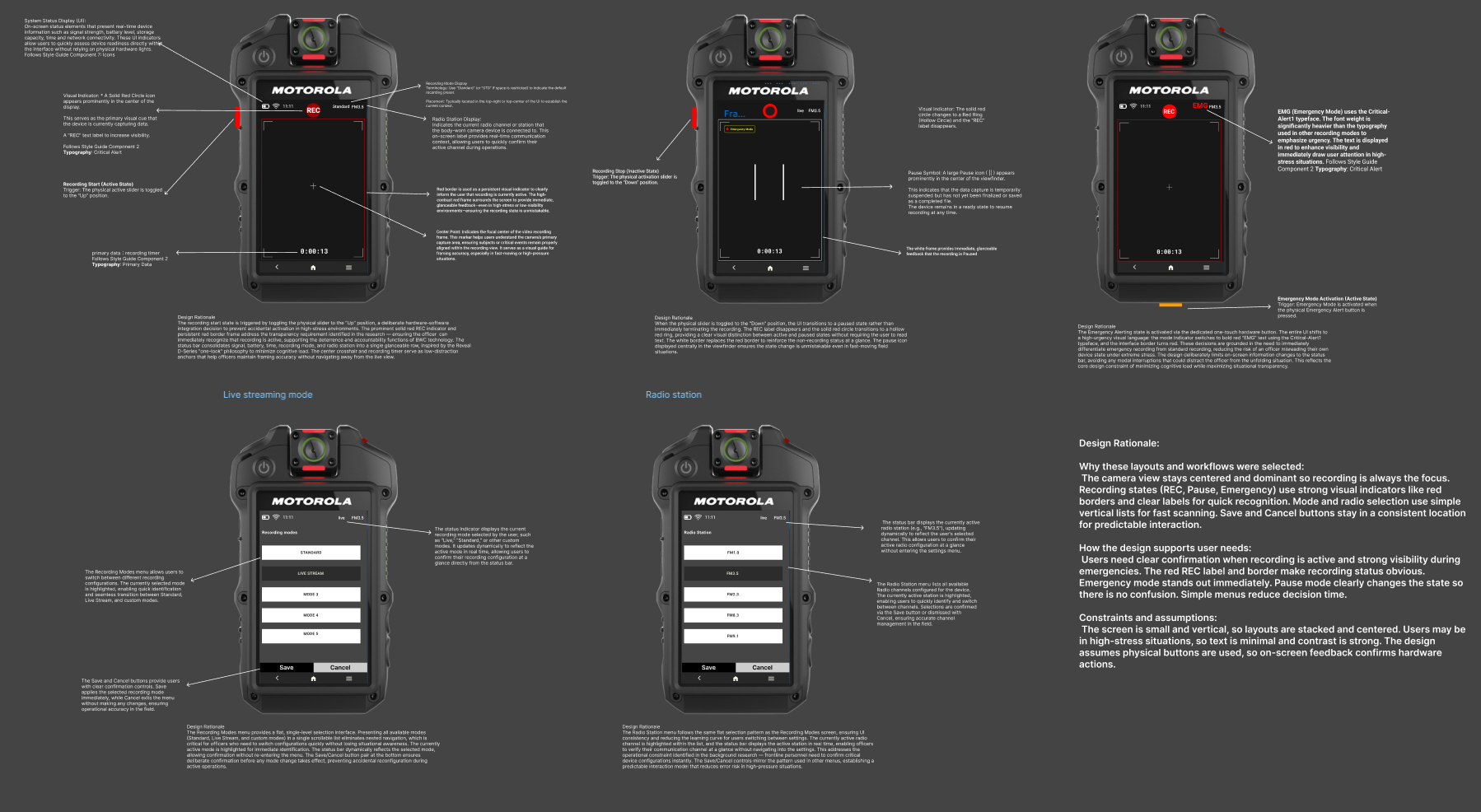
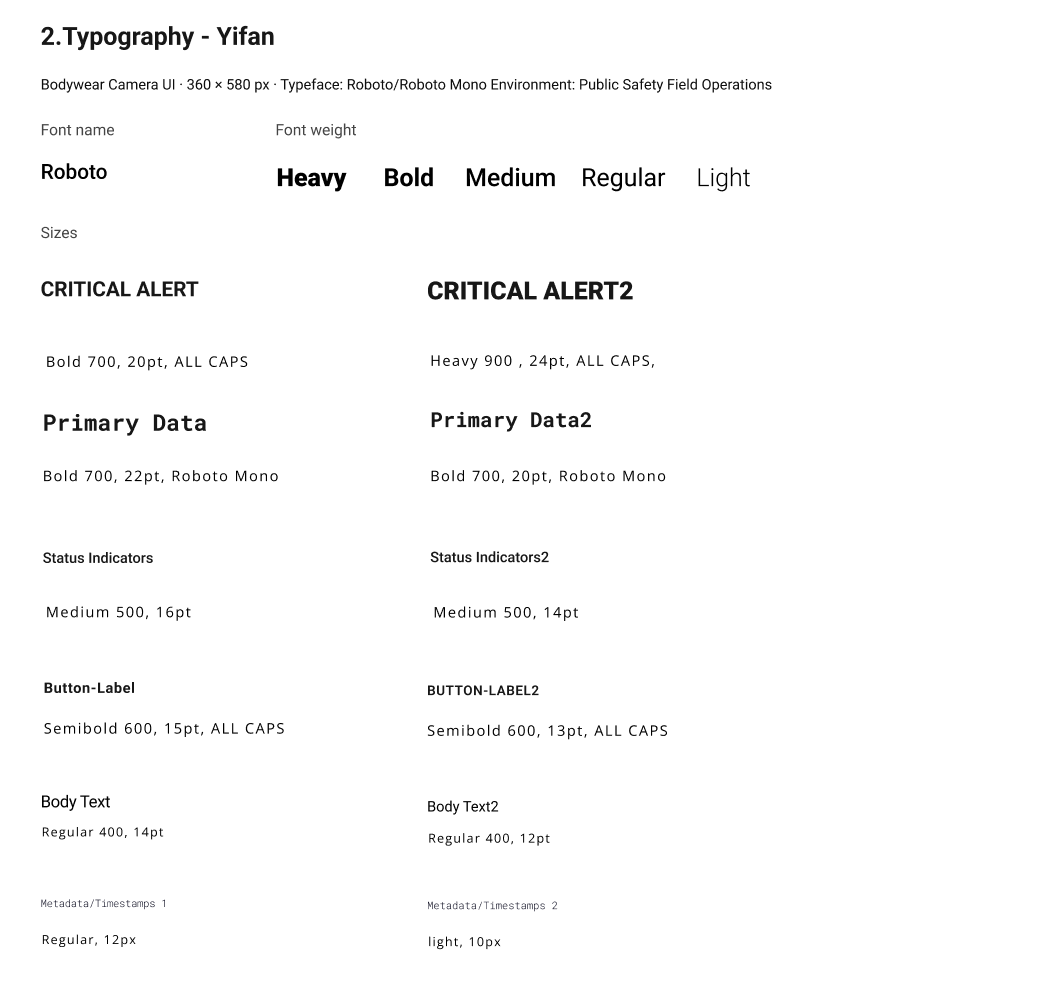
Typography & Readability: Spearheaded the Typography system within the Style Guide, optimizing font weights and legibility for the 3.2-inch display to ensure quick reading during field operations.
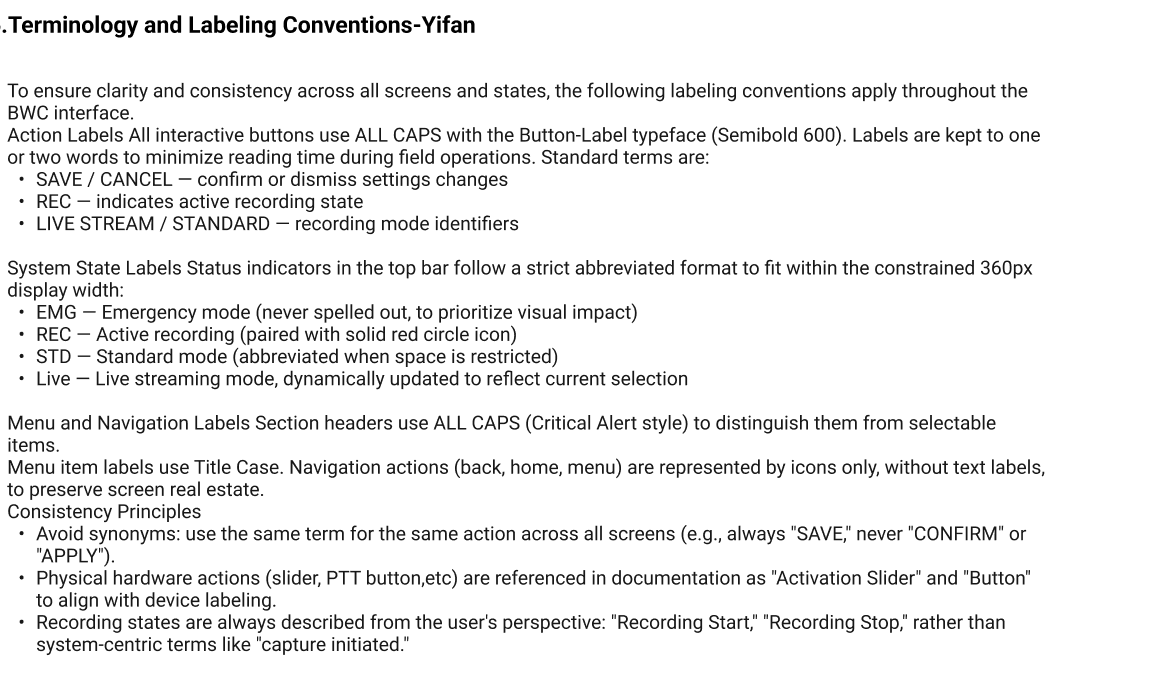
Terminology & Labeling Conventions: Established a strict Labeling Convention to ensure clarity and consistency. This included defining all-caps action labels and abbreviated system states (e.g., EMG, REC, STD) to maximize visual impact within the constrained 360px display width.
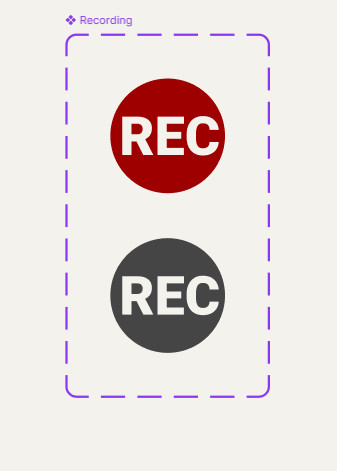
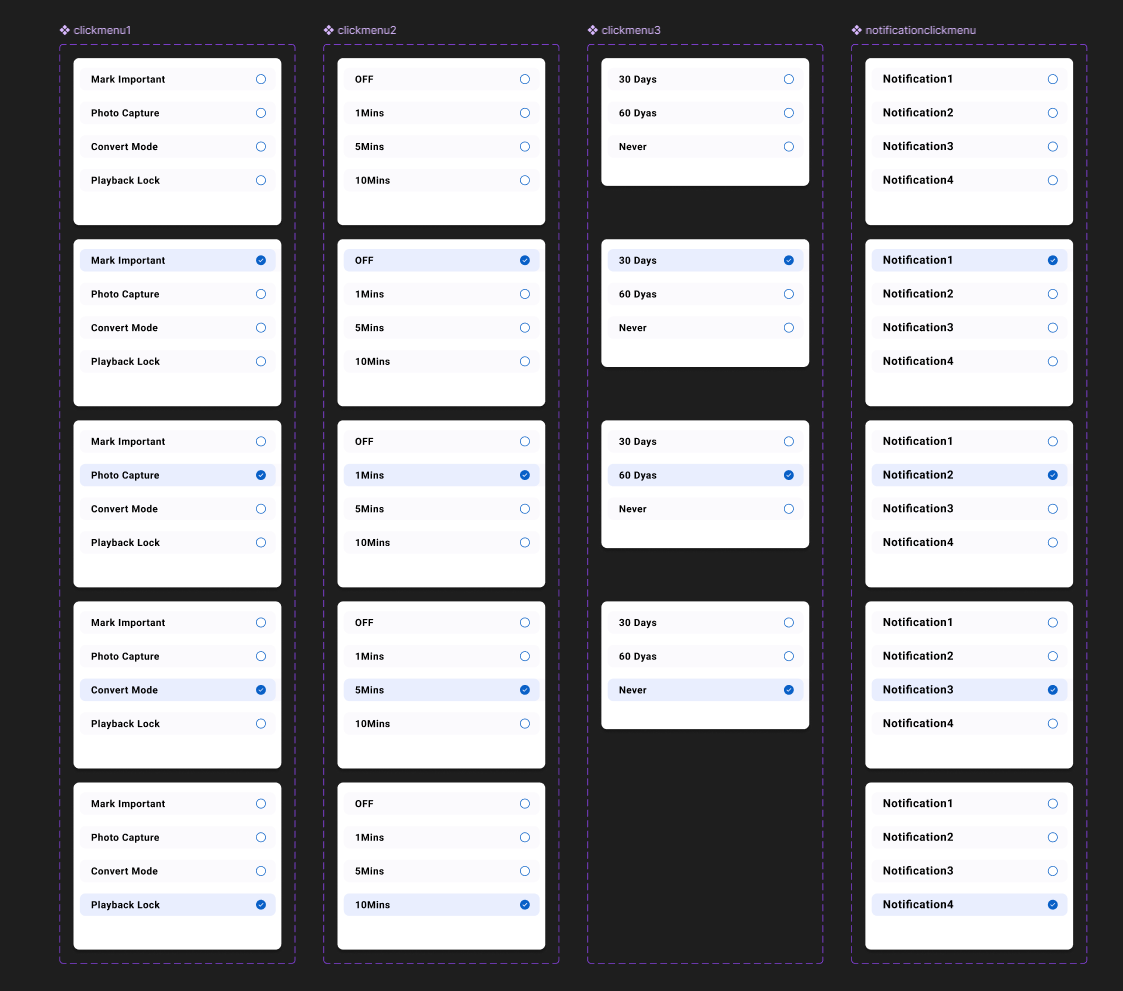
Core Component Design: Designed specialized UI components for the Recording&Setting Interface.
Phase 3: Interactive Prototyping
Designed and built the high-fidelity interactive logic for the following critical system modules:
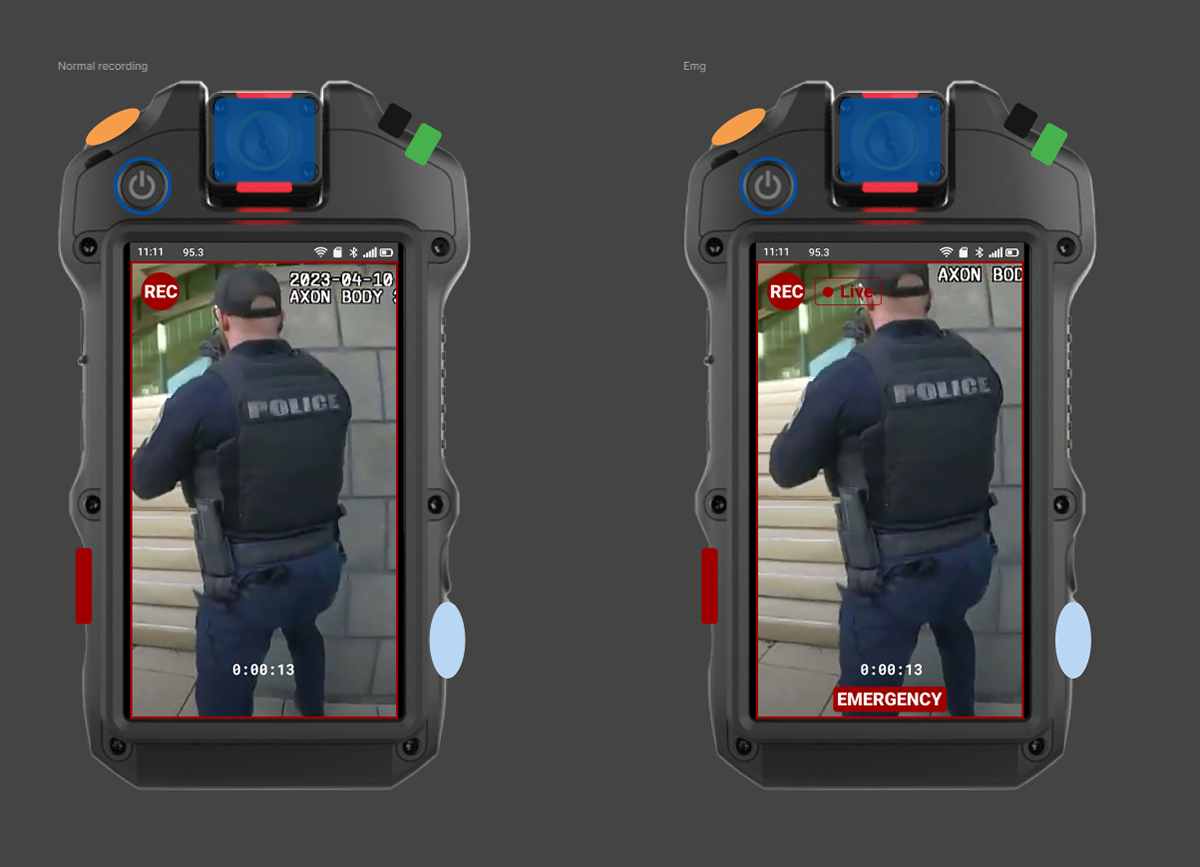
Emergency & Recording: Integrated hardware triggers (Emergency button and Record slider) with real-time digital feedback to ensure operational reliability.
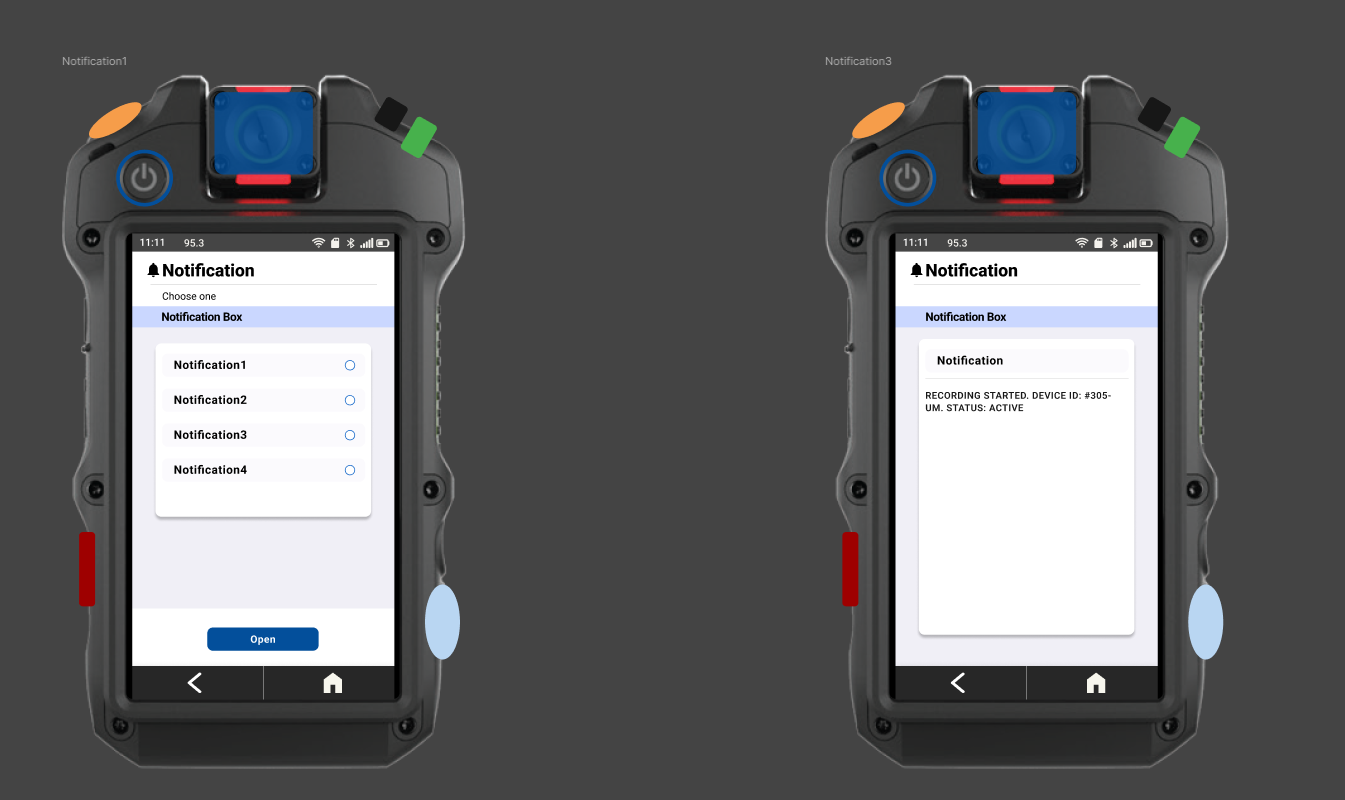
Notification System: Developed system alerts to keep officers informed .
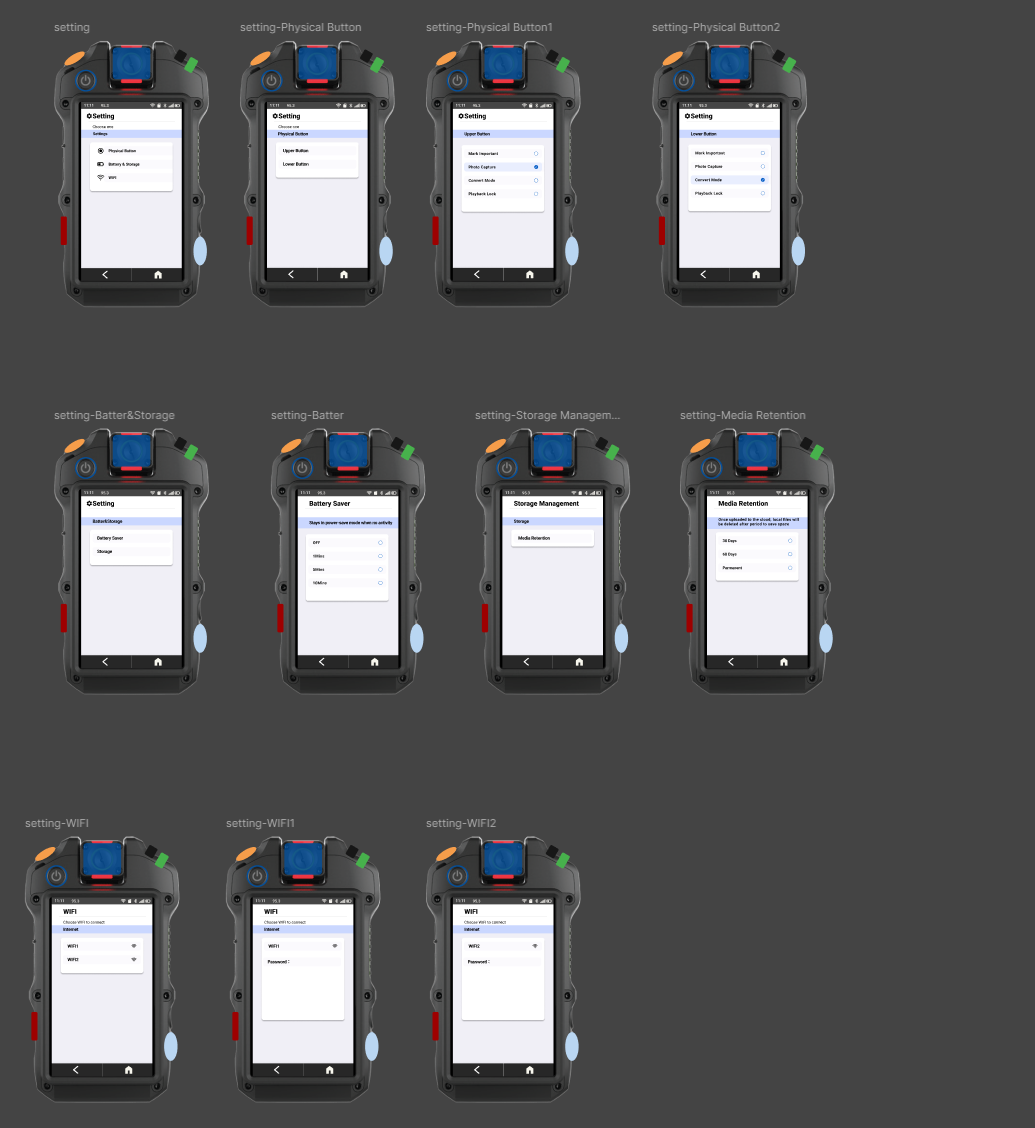
System Settings: Crafted a streamlined interface for high-frequency tasks such as Wi-Fi configuration and battery management.
Project Summary: BWC Interface
Overview
This project focuses on the design and development of an interactive Android-based mobile application prototype for a public safety body-worn camera (BWC). The system is not merely a software suite but a highly integrated interface that responds to physical hardware inputs to support officers in the field.
This project focuses on the design and development of an interactive Android-based mobile application prototype for a public safety body-worn camera (BWC). The system is not merely a software suite but a highly integrated interface that responds to physical hardware inputs to support officers in the field.
The Product
The App prototype is a specialized mobile system designed to streamline evidence collection and officer safety through several operational modes:
The App prototype is a specialized mobile system designed to streamline evidence collection and officer safety through several operational modes:
Emergency & Live Streaming: Officers can instantly trigger "Emergency Mode," which automatically initiates a live broadcast to the station for immediate situational awareness.
Dynamic Recording Modes: The system supports "Standard Recording" and a specialized "Covert Mode," which deactivates all outward indicators (LEDs/Screen) while continuing to record audio and video.
Privacy Management: A dedicated "Privacy Mode" allows officers to set a timer during breaks, during which all recording functions—including buffer recording—are disabled to ensure total privacy.
Data & Storage Tools: Features include metadata tagging for faster categorization during later reviews, video uploading, and real-time storage monitoring with estimated remaining recording time.
System Utilities: Supports essential field adjustments, including Wi-Fi updates, battery saver mode, and system notification viewing.
The Challenge & Constraints
The primary design challenge was to balance high-stakes operational efficiency with strict technical constraints:
The primary design challenge was to balance high-stakes operational efficiency with strict technical constraints:
Display Limitations: The interface is restricted to a 3.2-inch (360x640 px) touchscreen, requiring a layout that minimizes cognitive load during emergencies.
Hardware Integration: The software must maintain seamless synchronicity with physical controls, including a PTT button, emergency button, and dedicated recording sliders.
Extreme Legibility: With a pixel density of 229 ppi, the project required a rigorous typography and labeling convention to remain readable under duress.
Users & Needs
The target users are frontline emergency responders operating in high-stress, unpredictable environments. Their specific needs include:
The target users are frontline emergency responders operating in high-stress, unpredictable environments. Their specific needs include:
Operational Reliability: The ability to trigger critical actions (Recording/SOS) without looking at the screen.
Situational Awareness: A UI that prioritizes critical status alerts over secondary information to keep the officer focused on the scene.
Regulatory Transparency: Ensuring features like automatic recording and metadata tagging strictly adhere to legal and departmental requirements.
Design Process & Solutions
1. User Research & Problem Identification
The process began with an investigation into the socio-technical factors of body-worn cameras. Research indicated a significant "administrative bloat" where the burden of tagging footage could deter proactive policing.
The Solution: I adopted a "Safety-First, Accountability-Second" framework. This ensured the UI prioritized immediate physical safety and effortless recording over administrative tasks.
2. Task Analysis & Prioritization
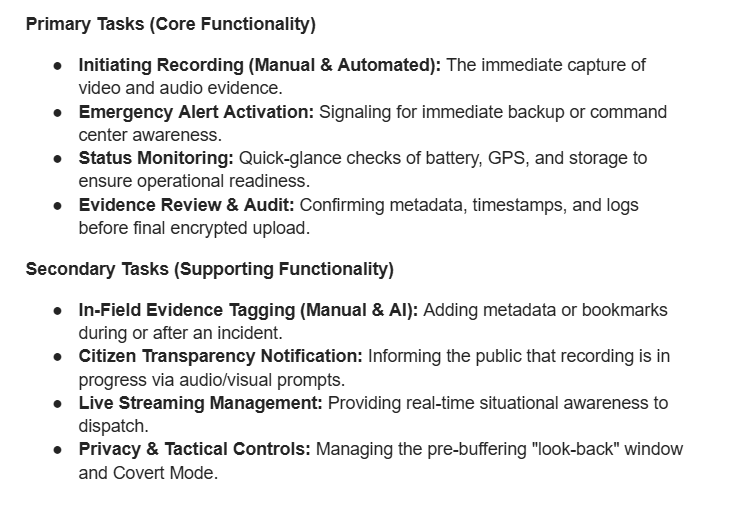
I categorized user actions into Primary and Secondary tasks to manage cognitive load.
Primary Tasks: Focused on core functionality like initiating recording, emergency alerts, and status monitoring.
Secondary Tasks: Included evidence tagging, live stream management, and privacy controls.
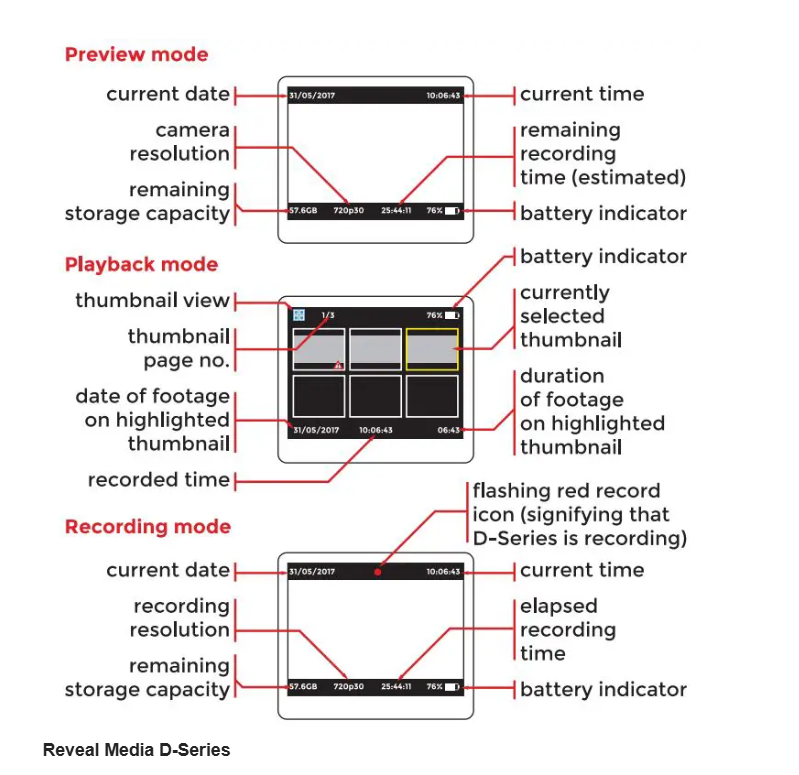
Outcome: This analysis led to a Flat Information Hierarchy, where critical telemetry (battery, storage, and recording status) is anchored to fixed positions, allowing for "one-look" verification without scrolling.
3. Ideation: Bridging Hardware & Software
To solve the challenge of a highly constrained 3.2-inch (360x640 px) display, the design seamlessly integrated software responses with physical hardware inputs.
Tactile Interaction: Critical actions like starting a recording or triggering an emergency alert were mapped to a physical slide gesture and a dedicated SOS button, ensuring reliability even when the officer cannot look at the screen.
Digital Integration: I designed the software to provide immediate visual feedback for these hardware triggers, such as an "EMG" (Emergency) state that initiates an automatic live broadcast to the station.
4. Design Standards & Style Guide
To ensure clarity under duress, I established strict Terminology and Labeling Conventions.
Visual Impact: I utilized an all-caps, semibold typeface for interactive buttons to minimize reading time.
Space Optimization: I defined abbreviated system states (e.g., REC, STD, EMG) to maximize the limited 360px width of the display.
Accessibility: Taking inspiration from the Hytera VM780, I implemented a Large-Target Grid UI for post-incident tagging, replacing standard lists with oversized touch targets that are functional even while wearing gloves.
5. Evaluation & Final Prototype
The process concluded with the development of a high-fidelity interactive prototype.
Refinement: Through iterative design, we incorporated features like Covert Mode—which deactivates all LEDs and tones for tactical operations.
Final Goal: The resulting solution successfully balances operational efficiency with the strict legal and departmental requirements for evidence integrity.
Reflections and Lessons Learnt
1. Reflections
The design process highlighted the critical need for "subtractive design" when working with extreme constraints like a 3.2-inch display. Initially, I focused on digital feature richness, but through task analysis, I realized that a frontline responder’s cognitive load is too high for complex touch interactions during an emergency. The success of this prototype lies in its ability to treat the software as an extension of the hardware, ensuring that the interface provides immediate, clear feedback for every physical trigger.
2. Lessons Learnt
Consistency is Vital for Safety: In a restricted 360px width, there is no room for ambiguity. I learned that a strict Terminology and Labeling Convention (using abbreviations like EMG, REC, and STD) is not just a stylistic choice but a safety requirement to ensure instant recognition.
Function Over Aesthetics: Designing for public safety taught me to prioritize a "Safety-First, Accountability-Second" framework. Every design decision, such as anchoring critical telemetry to fixed positions, was driven by the need to minimize cognitive load rather than visual decoration.